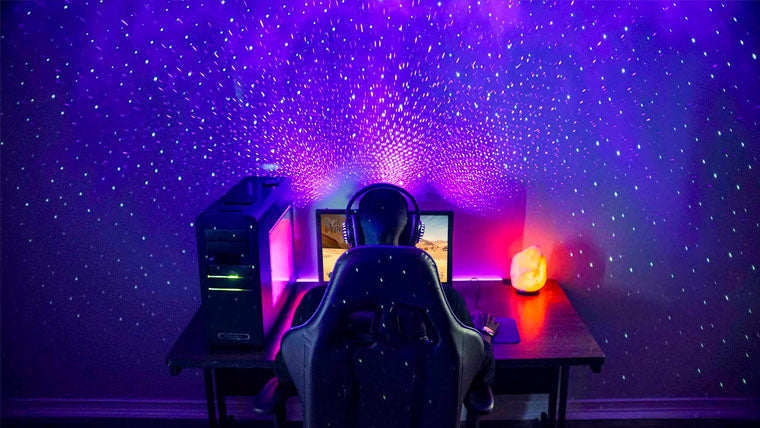
Gaming Room Lights That Actually Work
If your screen looks washed out, your room feels flat, or your LEDs give you a headache after an hour, you do not need more hype. You need better gaming room lights. The right setup does three things at once. It protects your eyes, shapes the mood of the room, and keeps your desk or TV area usable for real life, not just screenshots.
That matters now because most gaming spaces do double duty. You may use the same room for work, streaming, homework, or late-night sessions. Bad lighting turns all of that into a strain. Good lighting works like a well-set kitchen station. Everything is in reach, and nothing fights your eyes.
Here is the part that gets ignored: light is not decoration first. It is function first. Once you get that right, the cool part follows.
What to know about gaming room lights
- Layer your light. Use ambient, task, and accent lighting together.
- Avoid screen glare. Put bright sources where they do not reflect in your monitor or TV.
- Pick the right color temperature. Cooler white can help with visibility. Warm tones can calm the room.
- Use dimming. A good light that cannot dim is a half-finished tool.
- Keep cables and power in mind. Clean lighting still needs a clean setup behind the scenes.
How to build gaming room lights that help, not distract
The best setups start with layers. Ceiling light covers the room. A desk lamp or bias light helps the screen area. LED strips or panels add mood without taking over the whole space. That mix matters because one bright source alone often creates harsh contrast (and that is what causes fatigue).
Think of it like a basketball court. You do not want one blinding spotlight in the center and darkness everywhere else. You want even coverage with a few accents where the action happens.
Good gaming room lights should support the screen, not compete with it.
Start with ambient light
Ambient light sets the base. If the room is too dark, your eyes keep jumping between a bright monitor and a black wall. That strain adds up. A ceiling fixture, floor lamp, or large wall wash can smooth that contrast.
Look for bulbs or fixtures with dimming and a color temperature you can live with. Many gamers like cooler white during daytime use and warmer light at night. The best choice depends on how you use the room, not on whatever looks best in an ad.
Add task lighting where you actually need it
Task lighting helps you read controllers, swap gear, or work at a desk without turning the whole room into a spotlight. A small lamp behind the monitor or to the side of the desk can do more than a flashy ceiling panel. Keep it out of your direct line of sight.
And if you stream or record, this layer matters even more. You want your face lit evenly enough to look natural, not washed out or lost in shadow. Soft, indirect light usually beats a bare bulb every time.
Use accent lighting with restraint
Accent lighting is where RGB usually shows up. Fine. But keep it controlled. Strip lights behind a monitor, under a shelf, or around a desk edge can add depth without flooding the room.
Do not point LEDs straight into your eyes. That is the fastest way to make a room feel cheap. Bounce the light off a wall or surface instead. You get the glow without the sting.
What types of gaming room lights are worth buying?
Not every product labeled gaming gear deserves your money. Some of it is just plastic and marketing. Here is what tends to hold up:
- Bias lights behind a monitor or TV. These reduce eye strain by softening contrast.
- Smart bulbs for overhead fixtures. They give you color control without rebuilding the room.
- LED strips for shelves, desks, or backlighting. Cheap ones can look rough, so check color consistency and adhesive quality.
- Panel lights for streamers or content creators. These work well when you want even, soft light.
- Floor lamps with dimmers for flexible ambient light. Simple, solid, and often less fussy than smart-only gear.
Ask yourself one thing before you buy anything. What job is this light supposed to do?
If you cannot answer that in one sentence, do not add it to your cart.
Setup mistakes that ruin gaming room lights
The biggest mistake is chasing color before comfort. A room can look wild in a photo and feel miserable in use. Bright blue light everywhere may read as edgy, but it can also make skin tones weird and make the room harder to relax in later.
Another common miss is ignoring reflection. Glossy desks, shiny wall paint, and glass frames can all bounce light back at you. That turns a clean setup into visual clutter fast.
And do not overfill the room. If every surface glows, nothing stands out. Pick one or two focal points and let the rest stay calm.
A simple order for setting it up
- Turn on your main room light.
- Sit at your desk or game position.
- Check for glare on the screen.
- Add a soft backlight if the screen feels harsh.
- Layer in accent lights only after the basics feel right.
Choosing the right tone for your space
Color temperature changes the mood more than people expect. Cooler light can help a setup feel alert and crisp. Warmer light can make the room easier to live with during long sessions. If your room is also a bedroom, that tradeoff matters.
RGB can be fun, but it should not be the whole plan. A room with one strong base light and a few controlled accents usually feels more finished than a room packed with random color. That is the difference between a setup and a mess.
Better gaming room lights, fewer regrets
The smartest move is not buying more lights. It is choosing the few that solve the real problem in your room. Start with glare, then comfort, then style. Get those in order and the whole setup gets better. Want a room that looks sharp and feels easy on your eyes? Build the light around your screen, not around the product box.